Code 39 – Generator Settings
Barcode Content
Code 39 encodes uppercase letters (A to Z), digits (0 to 9), space character, and the special characters minus (-), period (.), dollar ($), slash (/), plus (+), and percent (%). The length of the barcode content is technically unlimited, however the available print area should be considered during planning.
Convert lowercase to uppercase letters
Since Code 39 does not support lowercase letters, you can use this option to specify whether the generator should automatically convert lowercase letters to uppercase in your input. If the checkbox is enabled, for example abc123 is automatically converted to ABC123. With the option disabled, entering lowercase letters would cause the generator to return an error message.
Append Optional Checksum
The checksum is appended to the content of the barcode and serves for error detection during scanning: The scanner calculates the checksum independently and compares it with the value found in the barcode. If both match, the scan is considered correct. Example: ABC-123 becomes ABC-123W – where the W represents the calculated checksum.
Via the subordinate checkbox "show in human readable line" you control whether the checksum is also printed in the text line below the barcode. This is useful when manual entry or verification of the complete value is required.
Wide/Narrow Bar Ratio
Code 39 belongs to so-called two-width barcodes and uses only two different bar widths: narrow and wide. (In contrast, Code 128 uses four different bar widths.) The ratio between the widths can be set between 2.0:1 and 3.0:1. A higher ratio means easier distinction between "wide" and "narrow" for the scanner. This can be useful when the barcode is printed on uneven surfaces or at low resolution. Note that the chosen ratio also affects the required overall width of the barcode. In practice, 2.5:1 is the most commonly used value.
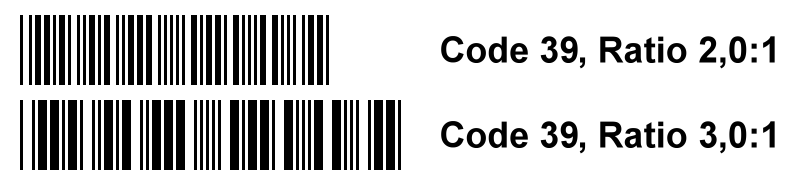
Further technical details about Code 39 (including structure, robustness, character set) can be found in our comprehensive comparison Code 128, Interleaved 2 of 5 and Code 39.
Code 39 Barcodes as Vector or Raster Graphics
Vector formats PDF, EPS, SVG: All coordinates are stored internally with a precision of 6 decimal places. The generated graphics can be scaled without loss of quality. Transparent backgrounds are supported by all three vector formats. The human-readable Code 39 character string is converted to paths, so no fonts are required. PDF and EPS are functionally equivalent and support both CMYK and RGB color models. EPS files contain an embedded TIFF preview for DTP programs that do not natively support EPS.
Raster formats PNG, BMP, JPG: The selected DPI value is stored in the file header, whereby resolution and physical dimensions in millimeters are directly contained in the file and can be correctly interpreted by graphics programs. The barcode bars are precisely aligned to the target resolution, which prevents aliasing effects and other unwanted artifacts. The resulting barcode graphics can also be printed on low-resolution printers (e.g. 203 or 300 DPI) without loss of quality. The PNG format enables transparent barcode backgrounds.
Code 39 Generator for Professionals – Batch Mode, InDesign + Illustrator ready
For higher requirements we recommend our software solution Barcode Vectorizer. It offers all functions of our free online generator and additionally:
Standard Edition:
- Direct transfer of the barcode as PDF, EPS, or SVG by dragging with the mouse or copy & paste to applications such as Adobe InDesign, Adobe Illustrator, or CorelDRAW
- Free color selection with precise values for color components (0–100 for CMYK, 0–255 for RGB)
- Save function for later reuse of your own designs
- Support for over 20 linear barcode types (including Code 39 and Code 39 Full ASCII)
Pro Edition – additionally:
- Batch mode: Create hundreds of barcodes from your own number lists at once – ideal for shipping labels, inventory management or logistics processes
- Serial number generator: Automatic generation of consecutive numbers with freely selectable start, end and increment values as well as optional checksum calculation
- Barcode API: Integration of the barcode generator into your own application or workflow
Download 30-Day Trial