ISMN Standard Sizes
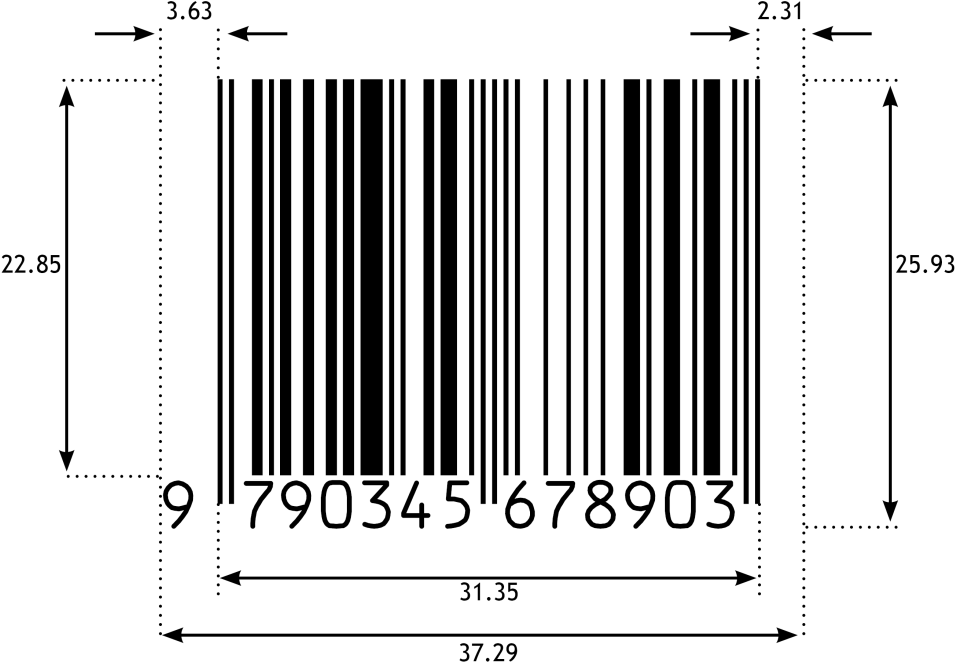
The official GS1 specification defines the ten standard sizes SC0–SC9 for ISMN. The dimensions of the most commonly used size SC2 are already set as default in the generator. If needed, choose another standard size from the table below, or enter custom width and height.
| Height (mm) | Width (mm) | Width + Add-On 2 | Width + Add-On 5 | |
|---|---|---|---|---|
| SC0 | 21.48 | 30.50 | 37.25 | 44.54 |
| SC1 | 23.34 | 33.56 | 40.99 | 49.01 |
| SC2 | 25.93 | 37.29 | 45.54 | 54.45 |
| SC3 | 28.52 | 41.02 | 50.09 | 59.90 |
| SC4 | 31.12 | 44.75 | 54.65 | 65.34 |
| SC5 | 35.01 | 50.34 | 61.48 | 73.51 |
| SC6 | 38.90 | 55.94 | 68.31 | 81.68 |
| SC7 | 42.78 | 61.53 | 75.14 | 89.84 |
| SC8 | 47.97 | 68.99 | 84.25 | 100.73 |
| SC9 | 51.86 | 74.58 | 91.08 | 108.90 |
Note: ISMN barcodes include the human-readable number with hyphens at the top. This increases the overall height of the resulting graphic. However, this is common and correct – the dimensions of the barcode symbol itself still comply with the specification.
The following image shows the standard size SC2 with all relevant dimensions, including the left and right margins (“quiet zones”). Our barcode generator automatically sets all measurements precisely in accordance with the GS1 specification.
OCR-B – The Standard Font for ISMN Barcodes
For the human-readable ISMN number below the barcode, our generator uses the font OCR-B by default. This is recommended by GS1 for all barcodes in the UPC/EAN family, including ISMN. Additional fonts are available for selection. The Text Offset from Symbol setting allows adjusting the spacing between the human-readable number and the barcode symbol. Negative values can also be used to compensate for excessive white space.
PDF and EPS – Common Vector Formats for ISMN
ISMN barcodes appear on sheet music, scores, and music publications. For prepress workflows, the vector formats PDF and EPS are the right choice. Both are functionally equivalent and support CMYK colors and transparent backgrounds for ISMN barcodes on colored covers. EPS files additionally contain an embedded TIFF preview for DTP applications without native EPS support, such as older versions of QuarkXPress.
All three vector formats (PDF, EPS, SVG) store coordinates with a precision of six decimal places. The two textual portions of the ISMN barcode are converted to outlines, eliminating the need to supply fonts to print shops.
Raster formats (PNG, BMP, JPG) store the selected DPI value in the file header, so that resolution and physical dimensions can be correctly interpreted by layout applications. Bar widths are precisely aligned to the target resolution, preventing aliasing effects and keeping barcodes fully scannable even at low print resolutions (e.g., 203 or 300 DPI). PNG is the only raster format to support transparent backgrounds.
ISMN Generator for Professionals – Batch Mode, InDesign + Illustrator ready
For more advanced needs, we recommend our desktop software Barcode Vectorizer. It includes all features of our free online generator, plus:
Standard Edition:
- Convenient selection of SC0–SC9 sizes with a single mouse click – no manual entry required
- Direct transfer of the barcode as PDF, EPS, or SVG by dragging with the mouse or copy & paste to applications such as Adobe InDesign, Adobe Illustrator, or CorelDRAW
- Custom color selection with precise component values (0–100 for CMYK, 0–255 for RGB)
- Save function for later reuse of custom designs
- Bar width correction, mirror image output, and use of all installed fonts in addition to OCR-B
- In addition to ISMN, support for over 20 different linear barcode types
Pro Edition – additionally:
- Batch mode: Create hundreds of barcodes at once from your own number lists
- Serial number generation: Automatic generation of sequential numbers including check digit
- Barcode API: Integrate the barcode generator into your own application
 Get It for My Desktop