ISBN-13 Standard Sizes
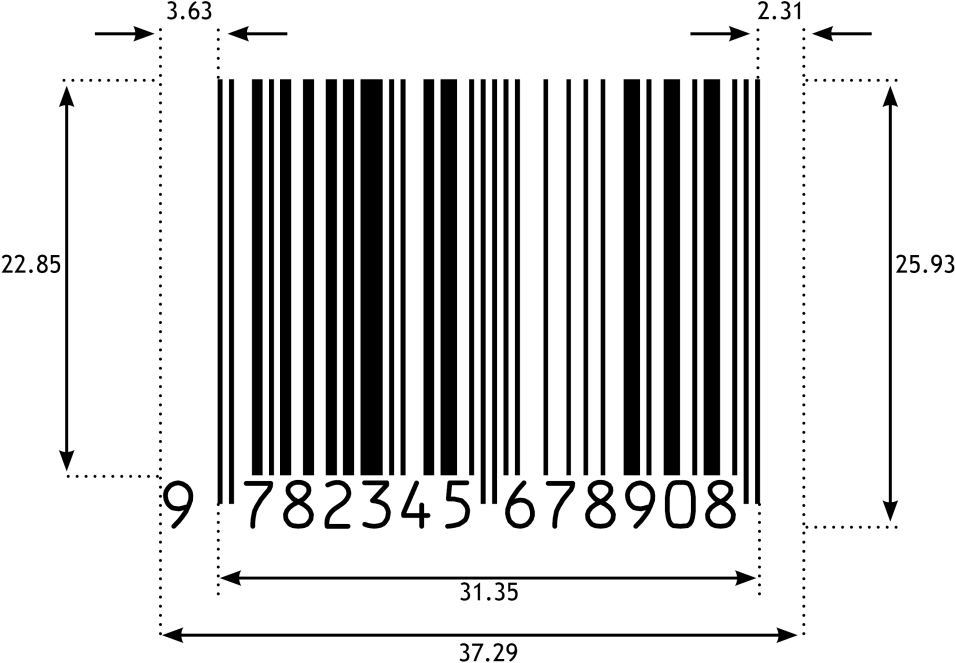
The official GS1 specification defines the ten standard sizes SC0–SC9 for ISBN-13. The dimensions of the most commonly used size SC2 are already set as default in the generator. If needed, choose another standard size from the table below, or enter custom width and height.
| Height (mm) | Width (mm) | Width + Add-On 2 | Width + Add-On 5 | |
|---|---|---|---|---|
| SC0 | 21.48 | 30.50 | 37.25 | 44.54 |
| SC1 | 23.34 | 33.56 | 40.99 | 49.01 |
| SC2 | 25.93 | 37.29 | 45.54 | 54.45 |
| SC3 | 28.52 | 41.02 | 50.09 | 59.90 |
| SC4 | 31.12 | 44.75 | 54.65 | 65.34 |
| SC5 | 35.01 | 50.34 | 61.48 | 73.51 |
| SC6 | 38.90 | 55.94 | 68.31 | 81.68 |
| SC7 | 42.78 | 61.53 | 75.14 | 89.84 |
| SC8 | 47.97 | 68.99 | 84.25 | 100.73 |
| SC9 | 51.86 | 74.58 | 91.08 | 108.90 |
Note: ISBN-13 barcodes include the human-readable number with hyphens at the top. This increases the overall height of the resulting graphic. However, this is common and correct – the dimensions of the barcode symbol itself still comply with the specification.
The following image shows the standard size SC2 with all relevant dimensions, including the left and right margins (“quiet zones”). Our barcode generator automatically sets all measurements precisely in accordance with the GS1 specification.
OCR-B – The Standard Font for ISBN-13 Barcodes
Technically, an ISBN-13 is an EAN-13 barcode, the number of which starts with 978 or 979. Another characteristic of the ISBN-13 is that the corresponding human-readable number appears twice in the barcode: once above the bars, prefixed with "ISBN" and hyphenated; and once below the bars, as in a normal EAN-13 barcode. For the latter, GS1 recommends the font OCR-B, which is why our generator uses it by default. Other fonts can be selected if needed.
PDF and EPS – Common Vector Formats for ISBN-13 Barcodes on Books
For placing an ISBN-13 barcode on the back cover of a book, the vector formats PDF and EPS are the preferred choice. Both formats are functionally equivalent: they support CMYK colors and transparent backgrounds for barcodes on colored book covers. EPS files also contain an embedded TIFF preview, compensating for the lack of native EPS display in some DTP applications, such as older versions of QuarkXPress.
All three vector formats (PDF, EPS, SVG) store coordinates with a precision of six decimal places. The two textual portions of the ISBN-13 barcode are converted to outlines, so no fonts are required when handing over to print shops.
Raster formats (PNG, BMP, JPG) store the DPI value in the file header, so that resolution and physical dimensions in millimeters are directly contained in the file and can be correctly interpreted by layout applications. The barcode bars are precisely aligned to the selected print resolution, preventing aliasing and other unwanted effects. This keeps barcodes fully scannable even at low print resolutions (e.g., 203 or 300 DPI). PNG supports transparent backgrounds.
ISBN-13 Generator for Professionals – Batch Mode, InDesign + Illustrator ready
For more advanced needs, we recommend our desktop software Barcode Vectorizer. It includes all features of our free online generator, plus:
Standard Edition:
- Convenient selection of SC0–SC9 sizes with a single mouse click – no manual entry required
- Direct transfer of the barcode as PDF, EPS, or SVG by dragging with the mouse or copy & paste to applications such as Adobe InDesign, Adobe Illustrator, or CorelDRAW
- Custom color selection with precise component values (0–100 for CMYK, 0–255 for RGB)
- Save function for later reuse of custom designs
- Bar width correction, mirror image output, and use of all installed fonts in addition to OCR-B
- In addition to ISBN-13, support for over 20 different linear barcode types
Pro Edition – additionally:
- Batch mode: Create hundreds of barcodes at once from your own number lists
- Serial number generation: Automatic generation of sequential numbers including check digit
- Barcode API: Integrate the barcode generator into your own application
 Get It for My Desktop